
2D Plan to Color-Coded Zone Map
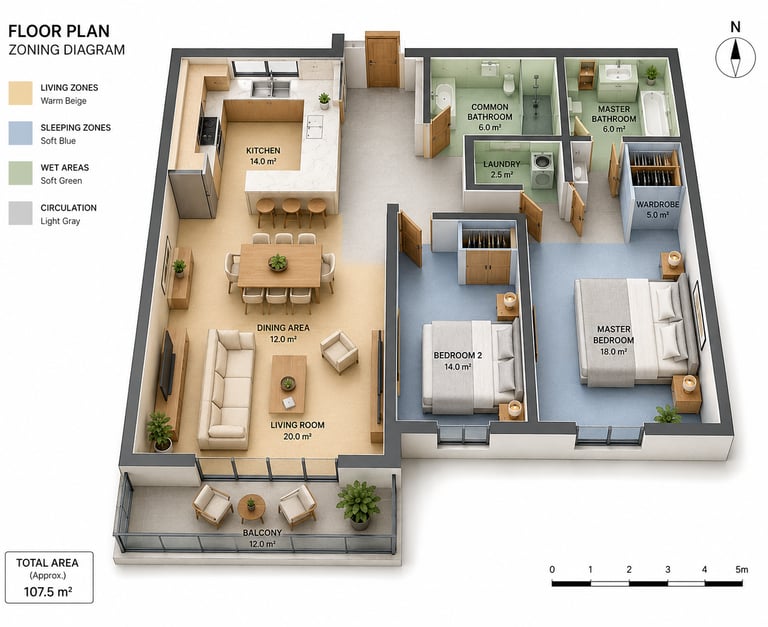
Convert the attached 2D architectural floor plan into a professional 3D isometric color-coded zoning diagram with the following strict specifications:
VIEW & PROJECTION:
3D isometric axonometric view at 30-45 degree angle - Slightly elevated camera to show all rooms clearly - No ceiling — open top view showing full interior - White seamless background, no shadows on background - Portrait or square composition with all rooms fully visible - No cropping of any room, wall, or annotation element.
COLOR ZONE SYSTEM — STRICT COLOR CODES:
Apply flat, semi-transparent floor fill colors to each zone. Colors must be soft, muted, and architecturally appropriate. Furniture and walls remain visible through the color fill.
ZONE 1 — LIVING ZONES (warm beige / #E8D5B0): Applies to: Living Room, Dining Area, Balcony Floor fill: warm beige, soft and matte
ZONE 2 — SLEEPING ZONES (soft blue / #B8C9D9): Applies to: Master Bedroom, Bedroom 2, any additional bedrooms, Wardrobe Floor fill: soft dusty blue, calm and muted
ZONE 3 — WET AREAS (soft green / #B8D4C0): Applies to: Master Bathroom, Common Bathroom, Kitchen, Laundry Floor fill: soft sage green, clean and neutral
ZONE 4 — CIRCULATION (light gray / #D4D4D4): Applies to: Entrance hall, corridors, any transitional spaces between rooms Floor fill: light neutral grey
Zone colors must NOT bleed into adjacent zones
Each zone color must stop precisely at the wall boundary
No gradient between zones
flat solid fill only
Color opacity: approximately 60-70% so floor texture or furniture beneath remains partially visible
FURNITURE & INTERIOR:
Place fully furnished interior consistent with the original floor plan layout
Furniture must sit within correct zone color — do not place furniture across zone boundaries
Furniture color: neutral warm tones (cream, oak, light grey) — must not compete visually with zone colors
Small accessories allowed: 2-3 indoor plants in green pots, kept small so they do not obscure zone colors
Walls: white or very light warm grey, consistent height
Wall thickness: uniform and architecturally accurate
REQUIRED ANNOTATIONS (all in English):
LEGEND BOX — upper left corner: Titled: "FLOOR PLAN / ZONING DIAGRAM" Four rows, one per zone: - Small color swatch square + zone name + descriptor Example: [■] LIVING ZONES · Warm Beige [■] SLEEPING ZONES · Soft Blue [■] WET AREAS · Soft Green [■] CIRCULATION · Light Gray Clean white box with thin border, sans-serif font
ROOM LABELS — inside each room: - Room name in ALL CAPS, bold - Area in m² directly below name (e.g. 20.0 m²) - Font: clean sans-serif, small but legible - Label color: dark charcoal (#2A2A2A), never white - Do NOT place labels over furniture — position in open floor area of each room
NORTH INDICATOR — upper right corner: - Simple compass rose or arrow with "N" label - Thin line style, not decorative - Must not overlap with any room or label
SCALE BAR — bottom center or bottom right: - Horizontal bar showing 0-1-2-3-4-5 metres - Clean minimal style with metre labels below - Accurate relative to the floor plan dimensions
TOTAL AREA BOX — lower left corner: - Small white box with thin border - Text: "TOTAL AREA" / "(Approx.)" / "[X] m²" - Fill in approximate total from the floor plan
TYPOGRAPHY & GRAPHIC STANDARDS:
Single font family throughout: clean geometric sans-serif (similar to Inter, DM Sans, or Helvetica)
All text horizontal
no rotated or angled labels
Consistent font size hierarchy: · Legend title: largest · Room names: medium · Area m² figures: slightly smaller than room names · Scale bar numbers: smallest
No decorative elements, no drop shadows on text
No colored text
dark charcoal only
STRICT CONSTRAINTS:
Do NOT alter the floor plan layout from the reference
Do NOT add rooms, walls, or openings not in the original
Do NOT use bright or saturated zone colors
muted architectural tones only
Do NOT omit any of the 5 annotation elements
Do NOT place the legend inside the floor plan area
Do NOT use perspective projection
isometric only
Do NOT render a roof or ceiling
Maintain exact same footprint and proportions as the attached reference floor plan.
-----------------------------------------------------
RECOMMENDED TOOLS & HONEST WORKFLOW:
BEST OPTION — ChatGPT GPT-4o:
Attach your 2D floor plan image directly with this prompt. GPT-4o is currently the only mainstream AI tool that can read an attached floor plan and attempt to preserve the room layout while applying color zones.
Staged approach for best results:
Step 1: Send the floor plan image + this full prompt. Ask GPT-4o to first confirm it has identified all rooms and their zone assignments before generating the image.
Step 2: If zone colors are incorrect or bleed across walls, add this correction: "Regenerate. Zone colors must stop at wall boundaries. Do not mix zone colors between adjacent
rooms. Keep furniture neutral."
Step 3: If annotations are missing or misplaced, add: "Add the legend box top-left, north arrow top-right, scale bar bottom-center, and total area box bottom-left. Do not place any annotation inside the floor plan footprint."
SECOND OPTION — Claude (claude.ai):
Claude follows color and annotation instructions more precisely than most tools when given structured prompts. However, Claude currently generates images only through its artifact system and output quality is more limited than GPT-4o for photorealistic 3D renders. Best use for Claude: generate the annotation layout, legend content, and zone assignment logic as a structured document, then use GPT-4o for the actual image generation with Claude's output as additional context.
ZONE CUSTOMIZATION OPTIONS:
To add a 5th zone (e.g. storage): Add: "ZONE 5 — STORAGE ZONES (warm terracotta / #D4A090): Applies to: all storage rooms, utility spaces, built-in wardrobe areas"
To change to a cool monochrome palette: Replace all zone colors with: Zone 1: #E8E8E8 / Zone 2: #C8C8C8 Zone 3: #A8A8A8 / Zone 4: #888888
To remove furniture for a pure technical diagram: Add: "No furniture, no accessories, no plants. Show zone color fills and wall outlines only. Pure technical zoning diagram."
Prompt
Chicspaces
Design faster without designing less.
Navigate
Get in touch
Support available Mon–Fri, 9–6 (Istanbul, GMT+3)
Remote-first — serving architects, studios & developers worldwide