
AI Concepts Workflow
AI concepts workflow helps designers speed up concept creation by handling idea generation, visual references, and early-stage visualization automatically.
The Problem Every Designer Knows
You have a client meeting in two days. You need a full concept ready — style direction, color palette, a visual that communicates the vision. And right now, you're staring at a blank screen.
If that sounds familiar, you're not alone.
The early stages of any interior design project are exciting, but they're also exhausting. Gathering references, building moodboards, translating what's in your head into something a client can actually see — it all takes time. A lot of it. And by the time you've nailed the concept direction, you've often burned through the most important days of your timeline.
That's exactly where AI steps in. Not to design the room for you — but to handle the heavy lifting in the background so you can spend your energy where it counts most: the creative instincts and human judgment that no algorithm can replicate.
Step-by-Step AI Workflow for Interior Designers
Step 1 — Idea Generation (Before You Open Pinterest)
Before you start scrolling Instagram for the hundredth time, try this instead: open ChatGPT or Claude and feed it your project brief. Describe the client, the space, the lifestyle, what they love, what they hate. Then ask for:
• Design styles that genuinely fit the brief — not just what's trending
• Color palette directions with a rationale behind each
• Key materials and textures that suit the mood
• The overall atmosphere you're trying to create
You'll get a solid conceptual starting point in minutes. More importantly, it'll often surface directions you wouldn't have thought of on your own.
💡 The single biggest mistake here: being too generic with your prompt. "Suggest a living room style" gives you something useless. "Suggest three concept directions for a 40m² open-plan living room for a couple in their 30s who travel often, prefer natural materials, and want the space to feel calm but not cold" — that gives you something you can actually work with.
Step 2 — Moodboard Creation
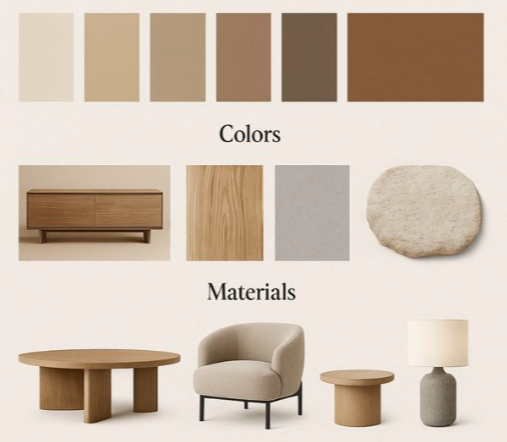
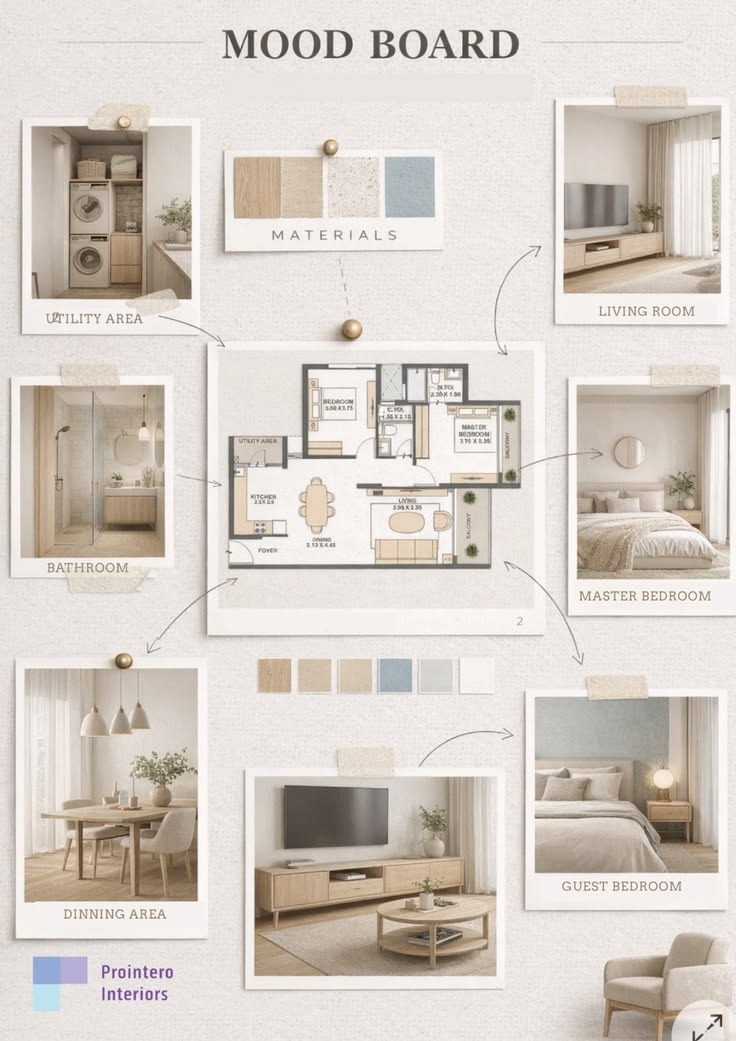
Once you've settled on a direction, make it visual. AI-powered tools like Midjourney, Canva AI, or dedicated platforms can generate or pull together imagery that matches your concept — fast.
A strong moodboard tells a story at a glance. Build yours around:
• A clear color palette — 3 to 5 tones maximum
• Texture and material references — stone, linen, aged brass, warm wood
• The right lighting mood — golden hour warmth feels completely different from cool northern light
• Furniture silhouettes that define the style
Clients often struggle with written descriptions of a design direction. A well-built moodboard closes that gap immediately and gets everyone aligned before a single decision is made.
💡 The Chic Spaces Prompt Library includes verified moodboard prompts organized by style and room type. Rather than crafting prompts from scratch, designers can copy a proven starting point and customize from there.
Step 3 — Style Exploration
Here's where things get interesting. Instead of committing to the first concept direction, use AI to quickly explore two or three alternatives side by side.
Generate a living room in warm minimalist style. Then try a modern classic version. Then something more eclectic. It takes twenty minutes — and suddenly you're walking into your client meeting with real choices instead of a single direction you're hoping they'll agree with.
Giving clients genuine options builds trust. It makes the process feel collaborative rather than prescriptive. And more often than not, it leads to a better final outcome.
Step 4 — 3D and Visual Concept Generation
This is probably the most exciting part of the AI workflow. Tools like Midjourney, Adobe Firefly, or specialist interior platforms can generate near-photorealistic room visuals from a text description alone.
Describe your space in detail:
• The layout and approximate dimensions
• Furniture placement and key pieces
• Materials, colors, and finishes
• Time of day and quality of light
What comes back isn't a final render — but it's close enough to show a client and have a real conversation. And it costs a fraction of the time and money that traditional 3D rendering requires.
💡 The key: use what AI generates as a starting point, not a finished product. Refine it. Apply your own eye. The AI builds the foundation; you make it good.
Step 5 — Refinement and Presentation
The visuals are ready. Now wrap everything into something a client can engage with.
Use AI to help write the concept narrative — the story that explains your design decisions in a way that feels intentional and considered. Why these colors? Why this material combination? What feeling is this space designed to create?
Then pull everything into a presentation tool like Gamma or Beautiful.ai. These platforms build polished decks quickly — so your concept looks as good on screen as it does in your head.
The end result: a complete, professional concept package. Delivered faster than you ever thought possible.
─────────────────────────────────────
The Real Question: How Much Time Does This Actually Save?
Here's an honest breakdown based on a typical residential concept package — one room, three style directions, client-ready presentation:
• Traditional approach: 2 to 3 days from brief to concept delivery
• AI-assisted approach: 4 to 6 hours for the same output quality
That time savings compounds across a project. And across a year, it's the difference between taking on 20% more work or having 20% more time — whichever matters more to you right now.
─────────────────────────────────────
Frequently Asked Questions
Can AI replace interior designers?
No — not even close. AI can generate visuals and assist with research, but it can't read a room, understand a client's personality, or make the nuanced creative decisions that define great design. The designers who use AI well will have a real advantage. But replacing the human judgment behind great design? That's not what this is.
What is the best AI tool for interior design?
It depends on what you need it for. For generating interior visuals, Midjourney is the most popular choice among working professionals right now. For concept development and writing, ChatGPT or Claude are hard to beat. Most designers end up using two or three tools in combination, each one doing a different job in the workflow.
Is AI interior design only for tech-savvy designers?
Not at all. The tools that are most useful for designers right now are built to be accessible. If you can describe a room in a sentence and click a button, you can use these tools effectively. Most designers who try them are surprised by how quickly it clicks.
─────────────────────────────────────
Final Thoughts
The way designers work is shifting — and it's shifting fast. That's not something to be anxious about. It's something to get ahead of.
AI doesn't take the creativity out of interior design. If anything, it gives you more room for it — because you're spending less time on the mechanical parts of the process and more time on the work that actually defines you as a designer.
Start small. Pick one tool. Try it on a real project. See how it fits into the way you already work. You don't need to overhaul everything at once — just start somewhere.
Explore our curated Prompt Library at Chicspaces — every prompt is verified by a professional interior designer.
Chicspaces
Design faster without designing less.
Navigate
Get in touch
Support available Mon–Fri, 9–6 ET
Remote-first — serving designers worldwide