
How to Use AI Writing Tools for Interior Design
Real Prompts That Work
Most interior designers who try AI writing tools for the first time come away underwhelmed. They type something like "help me with interior design" and get a generic, surface-level response that could have been written by anyone. They conclude the tool is not useful for professional work and go back to doing everything manually.
The Difference Between a Weak Prompt and a Strong One
Before the specific prompts, one principle that applies to all of them: the quality of AI output is directly proportional to the specificity and context of the input. The more the AI knows about your situation, your client, your design direction, and exactly what you need, the more useful the output will be.
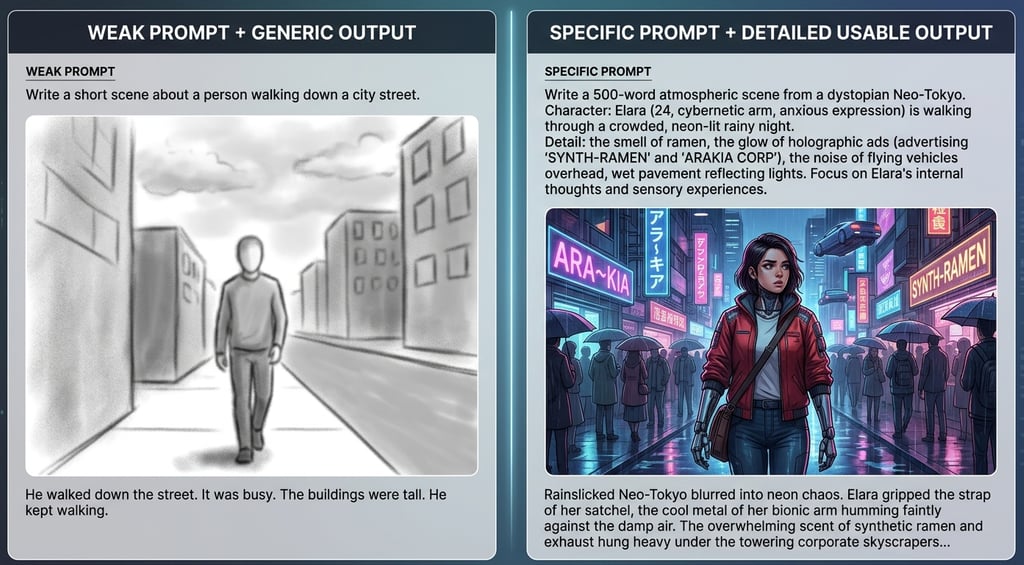
A weak prompt asks a general question. A strong prompt provides context, specifies the format, identifies the audience, and states exactly what is needed.
Weak: "Write a design brief for a living room."
Strong: "Write a design brief for a 45sqm open-plan living and dining space for a couple in their 40s, no children, one large dog. They want a warm, minimal aesthetic — references include Axel Vervoordt and Rose Uniacke. Budget is 35,000 USD for furniture and finishes. They work from home and need the space to function as a relaxed workspace during the day and an entertaining space in the evening. Format the brief with sections for spatial concept, material direction, furniture approach, lighting strategy, and key constraints."
The second prompt produces a document you can actually use. The first produces content you have to rewrite entirely.
Give the AI the same information you would give a senior colleague before asking them to help with a task. Context is the most important ingredient in a useful prompt.
Use Case 1: Writing Client Proposals
Writing proposals is one of the highest-value use cases for AI in a design practice. A well-written proposal takes two to four hours to produce from scratch. With AI assistance, the same quality output takes thirty to forty-five minutes.
The workflow: gather your project notes, the client brief, your fee structure, and your scope of work. Paste this into the AI as context, then use a prompt like the one below.
You are helping an interior designer write a professional project proposal. Here is the project context: [PASTE: client name, project location, project type, scope summary, budget range, timeline, key client requirements, your fee structure] Write a professional proposal with the following sections:
1. Project Understanding — summarize the brief in a way that shows you have listened
2. Design Approach — describe your conceptual direction for this project
3. Scope of Services — list exactly what is included in your fee
4. What Is Not Included — list exclusions clearly
5. Investment — present your fee with payment milestone structure
6. Next Steps — a clear, specific call to action Tone: professional, warm, confident. Length: 600-800 words. Write as if you are the designer speaking directly to the client.
After the AI produces the draft, review it for accuracy, add any project-specific details that require your judgment, and adjust the voice to match your own. The structural and written work is done — you are editing, not writing from scratch.
Claude Pro is the recommended tool for this workflow — visit claude.ai to get started.
Canva Pro — build professional client presentations and moodboards faster
Use Case 2: Generating Design Briefs From Client Conversations
After a client consultation, you have notes, voice memos, and a general sense of direction. Turning these into a structured design brief that both you and the client can refer to requires organization and clear writing — both tasks AI handles well.
I have just finished an initial client consultation. Here are my rough notes from the meeting: [PASTE YOUR RAW NOTES] Please organize these into a structured design brief with the following sections: - Client Profile: who they are, how they live, what they need from the space - Project Scope: rooms involved, approximate areas, what work is required - Style Direction: aesthetic references, things they love, things they want to avoid - Functional Requirements: specific practical needs for each space - Material Preferences: any materials specified or excluded - Budget Parameters: investment range and any budget constraints noted - Timeline: any deadlines or phasing requirements - Open Questions: things that need to be clarified before design work begins Write in clear, professional language suitable for sharing with the client for confirmation.
Sharing the design brief with the client for confirmation after the meeting is itself a professional practice that builds confidence and reduces misunderstanding. AI makes this practical rather than aspirational.
Use Case 3: Writing Material Specification Documents
Specification documents are essential for communicating design decisions to contractors and suppliers, and they are tedious to write from scratch. AI can produce a professional specification document from a list of decisions in minutes.
I need to write a material specification document for the following project: Project: [NAME], [LOCATION] Room: [ROOM NAME] Here are the material decisions made: - Floor: [material, supplier, reference number, finish, dimensions] - Walls: [paint color, supplier, reference, finish] - Ceiling: [treatment, color, finish] - Joinery: [material, finish, supplier] - Worktop/countertop: [material, supplier, reference] - Splashback/feature surface: [material, supplier, reference] - Hardware: [supplier, finish, reference numbers] Write a formal material specification document organized by surface, including supplier contact details where provided, reference numbers, notes on installation requirements, and any special handling or sealing instructions relevant to each material. Format clearly for a contractor.
Use Case 4: Solving Spatial and Design Problems
AI tools are surprisingly good at working through spatial and design problems when given sufficient context. They will not replace design judgment, but they function as a useful thinking partner — generating options, identifying considerations you may not have thought of, and stress-testing proposed solutions.
I am working on a spatial planning problem and need help thinking through options. The situation: [DESCRIBE THE SPACE — dimensions, natural light, structural constraints, fixed elements like windows and doors] The requirement: [DESCRIBE WHAT THE SPACE NEEDS TO DO — functions, user numbers, specific activities, storage needs] The constraint: [DESCRIBE THE MAIN CHALLENGE — awkward column, low ceiling, limited natural light, client requirement that creates tension with spatial logic, etc.] Please suggest three different spatial approaches to this problem, describing for each one: the core logic of the arrangement, how it addresses the main constraint, what it does well, and what its limitations are. I will use these as starting points for my own design development.
This prompt type is particularly useful early in a project when you are exploring options rather than refining a direction. The AI cannot know your specific site the way you do, but it can generate a wider range of starting points than any single designer would typically explore manually.
Use Case 5: Creating Client-Facing Presentation Copy
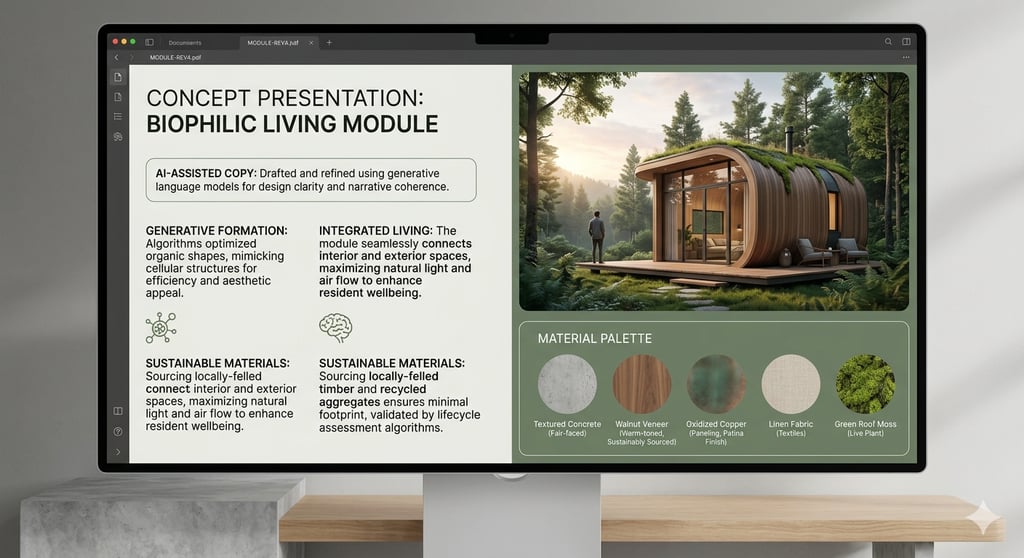
Presentation documents need copy that explains design decisions clearly to non-designers — describing why choices were made, what effect they create, and how they serve the client's brief. This writing is time-consuming and requires a balance of technical accuracy and accessible language that AI handles well.
I need to write presentation copy for an interior design concept board. The audience is the client — not a designer — so the language should be clear, warm, and explain the design thinking without using technical jargon. The design concept is: [DESCRIBE IN YOUR OWN WORDS — the spatial strategy, the material palette, the atmosphere you are creating, the key decisions and why you made them] Please write: 1. A concept statement (3-4 sentences) that captures the emotional and experiential essence of the design 2. A material palette description (one paragraph) that explains the material choices and how they relate to each other 3. A lighting narrative (one paragraph) that describes the lighting approach and what it creates in the space 4. A furniture direction paragraph that explains the furniture approach and how it serves the way the client lives Tone: warm, confident, and genuinely descriptive. Avoid cliches like "timeless," "luxurious," and "seamlessly blend."
Use Case 6: Writing Blog Content and Social Media Captions
For designers building a content presence alongside their practice, AI significantly reduces the time required to produce regular written content. The key is to start with your own knowledge and experience and use AI to structure and write it — not to ask AI to generate ideas it has no connection to.
I want to write a blog article for interior designers and design-interested homeowners. Here is what I want to say: [PASTE YOUR OWN NOTES, OBSERVATIONS, OR TALKING POINTS — even in rough form] Please write a 900-1100 word blog article based on these ideas. Structure it as follows: - Opening paragraph that hooks the reader with a relatable problem or observation - 4-5 substantive sections with H2 headings, each covering one main point - A closing paragraph that gives the reader a clear takeaway or next step - 3 FAQ questions and answers at the end Tone: conversational and direct, like a knowledgeable designer talking to a peer. No bullet points in the body text. No excessive bolding. No phrases like "dive in," "game-changer," or "at the end of the day."
For social media captions, a simpler version of this prompt works well:
Write 3 alternative Instagram captions for a post about [TOPIC]. The audience is interior designers and design-interested homeowners. Tone: direct, knowledgeable, human. Each caption should be 3-5 sentences. No hashtag suggestions, no emojis unless I ask. Give me three different angles: one that leads with a practical tip, one that leads with a contrarian observation, and one that leads with a question.
prompts for interior design AI workflows: https://chicspacesstudio.com/prompt-library
Use Case 7: Preparing for Difficult Client Conversations
One of the most underused applications of AI in a design practice is preparing for challenging conversations — delivering bad news about budget, managing a scope dispute, responding to a client who is unhappy, or renegotiating a fee. These conversations are high-stakes and benefit from preparation.
I have a difficult client conversation coming up and I want to prepare. Here is the situation: [DESCRIBE THE SITUATION — what happened, what the client wants, what you think is fair, what the relationship has been like, what outcome you are hoping for] Please help me prepare by:
1. Identifying the main points of potential conflict and how the client is likely to frame them
2. Suggesting how I might open the conversation in a way that is direct but not defensive
3. Drafting two or three specific responses to the objections the client is most likely to raise
4. Suggesting a proposed resolution I could offer that is fair to both parties I want to go into this conversation feeling prepared and clear, not reactive.
This use case alone is worth the subscription cost for any designer who has spent hours dreading a client call and then been caught off guard when it happened.
What AI Cannot Do in Interior Design
A clear-eyed view requires acknowledging the limits as well as the strengths:
• AI cannot generate images. ChatGPT and Claude are text tools. For visual concept work, separate image generation tools are required — Adobe Firefly (included in Creative Cloud) and Google ImageFX are strong options for interior design references.
• AI does not know your specific project. It works from what you tell it. Incomplete context produces incomplete output. Garbage in, garbage out applies here as much as anywhere.
• AI cannot replace design judgment. The spatial decisions, the material relationships, the understanding of how a specific client lives — these require human expertise and direct knowledge of the situation. AI accelerates the work around those decisions. It does not make the decisions.
• AI output requires editing. The first draft from any AI prompt is a starting point. It needs to be checked for accuracy, adjusted for your voice, and refined for the specific context. Designers who use AI output without review create problems.
The right mental model: AI is a capable junior assistant who works very fast. You still need to brief them properly, check their work, and apply your own judgment to the result.
FAQ
Q: Is Claude better than ChatGPT for interior design work?
A: Both are capable for the use cases in this article. Claude tends to produce slightly more nuanced, less formulaic prose, which makes it preferable for client-facing writing. ChatGPT has a broader plugin ecosystem and handles structured data tasks like spreadsheets and calculations slightly better. Many designers use both for different tasks. Start with whichever you find more intuitive and switch if you hit limitations.
Q: Do I need a paid subscription or is the free version sufficient?
A: The free versions of both tools are adequate for occasional use. For regular professional use — multiple prompts per day, longer documents, more complex tasks — the paid versions offer meaningfully better output quality, longer context windows, and faster response times. Claude Pro is around $20 per month and is recovered in the first hour of productive use. For visual work alongside writing, Adobe Creative Cloud includes Firefly AI across Photoshop and Illustrator and remains the professional standard. [AFFILIATE LINK: Adobe Creative Cloud — includes Firefly AI for visual design work: https://www.adobe.com/creativecloud]
Q: How do I make sure the AI output sounds like me rather than like a generic AI?
A: Include a style note in your prompts. Something like: "My writing style is direct and professional, without corporate jargon. I use short sentences. I do not use filler phrases or excessive adjectives. Match this style." You can also paste a sample of your own writing and ask the AI to match the voice. The more specific the instruction, the closer the output will be to your natural style.




Chicspaces
Design faster without designing less.
Navigate
Get in touch
Support available Mon–Fri, 9–6 ET
Remote-first — serving designers worldwide